The Training module is where competency review results turn into action: whatever skill is lacking, learn that skill. This article maps out the module and shows the setup order.
What the module includes
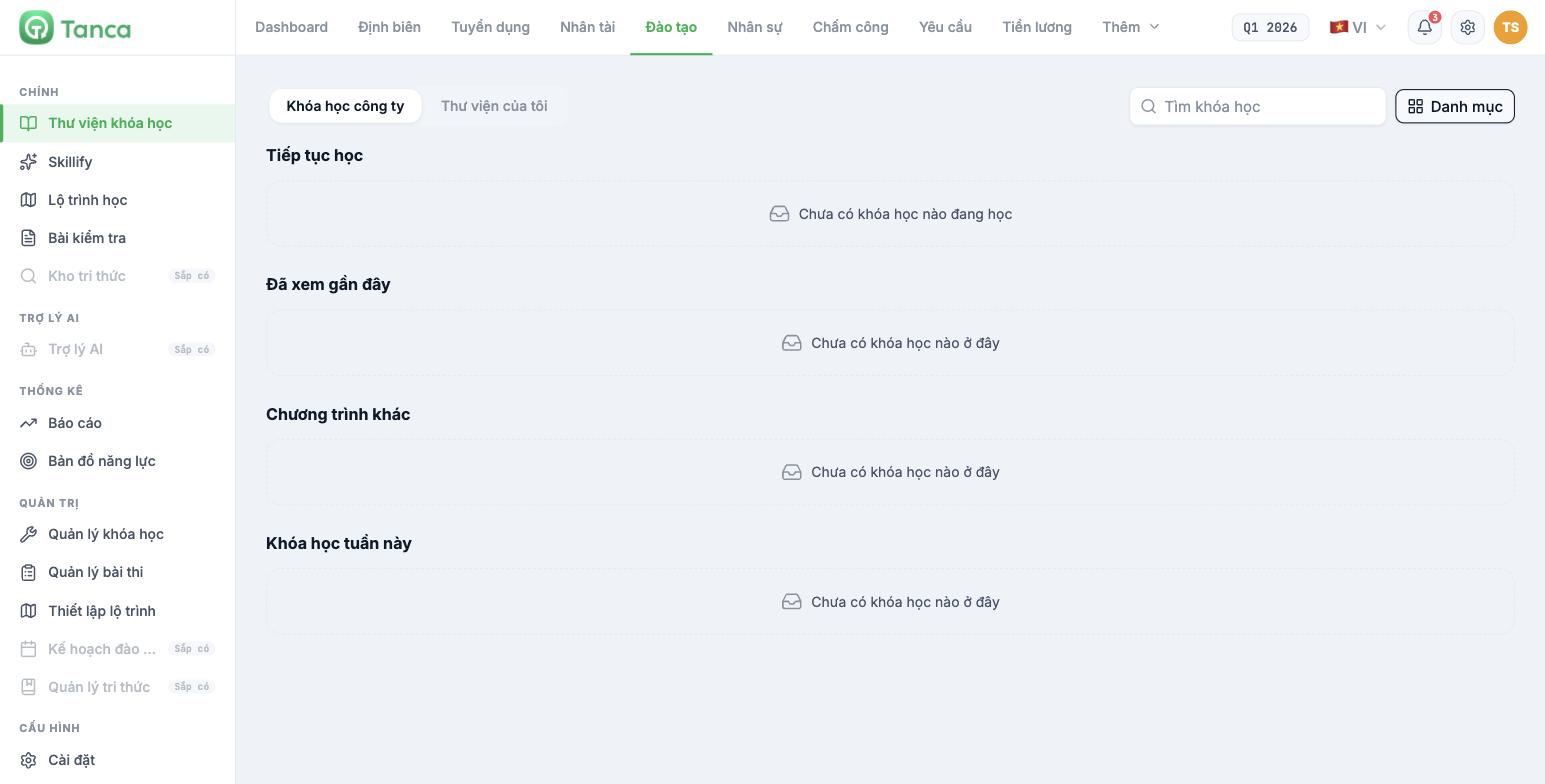
| Group | Section | Used for |
|---|---|---|
| Main | Course library | The screen learners open to find and take courses |
| Skillify | Tanca's external course library — article B16-08 | |
| Learning path | The learning path of the person currently signed in | |
| Tests | Tests assigned to the person currently signed in | |
| Knowledge base | Coming soon | |
| AI assistant | AI assistant | Coming soon |
| Statistics | Reports | Training reports — article B16-09 |
| Competency map | Competency review results, viewed from within the Training module | |
| Administration | Course management | Create and edit courses — article B16-02 |
| Test management | Create tests and exam papers — article B16-05 | |
| Learning path setup | Choose which courses are mandatory — article B16-06 | |
| Training plan | Coming soon | |
| Knowledge management | Coming soon | |
| Configuration | Settings | Program sources · Categories · Managers — article B16-07 |
Four sections are labeled Coming soon: Knowledge base, AI assistant, Training plan, Knowledge management. Don't build operational plans around these four sections.
The closed loop with the Talent module
This is the greatest strength of Tanca's Training module, and also the reason to set up the Talent module first:
- Build the Skill library in Talent (article B13-02).
- Build a competency framework for each job title (article B13-04).
- Run a competency review cycle (article B13-06).
- Read the competency gaps — who lacks which skills (article B13-09).
- Create courses attached to exactly those skills in the Training module (article B16-04).
- Learners see those courses in the Recommended from your skills section of their Learning path.
- Review again in the next period and see whether the gaps have narrowed (article B13-07).
The Skills field when creating a course draws directly from the Talent module's Skill library — the same list, not two systems. This is a major difference from the Recruitment module, where the competency framework is a completely separate system (article B15-05).
Initial setup order
- Settings › Categories — set up a few categories to classify courses (article B16-07).
- Settings › Program sources — set up content sources, for example Internal Training Team.
- Settings › Managers — who can administer this module.
- Course management — create your first course (article B16-02) and build its content (article B16-03).
- Test management — create tests if the course needs assessment (article B16-05).
- Learning path setup — turn on which courses are mandatory (article B16-06).
- Pilot with one person before opening it to the whole company.
Three different things that are easily confused
| Item | What it is | Managed where |
|---|---|---|
| Question page within a course | A question placed between lessons so learners can check themselves | In the course content — article B16-03 |
| Test | A separate assessment, with a passing score and exam papers | Test management — article B16-05 |
| Exam paper | A variant of a test. One test can have multiple papers | Inside the test — article B16-05 |
Question pages within a course have no passing score. If you want to stop learners from moving on until they pass, you must use a test, not a question page.

