When the list only has twenty people, scrolling by hand is fine. From a hundred people upward, the three tools below are what you'll use every day.
The search box
The Search by name, code, phone number box searches across all three fields at once. Typing part of a value also returns results — typing `SG00` returns every employee whose code starts with SG00.
Three filters
| Filter | Filters by | Used for |
|---|---|---|
| All statuses | Account activity status | Finding people whose accounts are disabled or who are on probation |
| All departments | Department | Counting headcount by department, checking after an import |
| All branches | Branch | Chain managers viewing each location separately |
The three filters stack with each other and with the search box. If the results are unexpectedly empty, check whether any filters are still on — this is the most common cause of the question "I can't find this employee".
Hide and show columns
- Click the icon in the right corner of the table header row.
- Uncheck columns you don't need to make the table more compact.
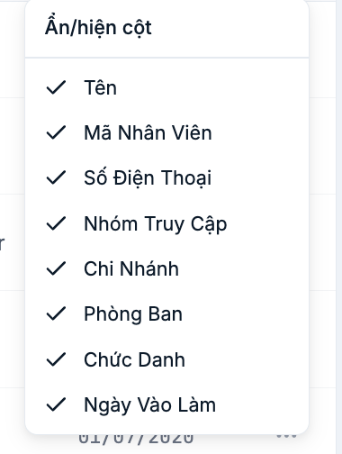
| Column | Show when |
|---|---|
| Name | Always show |
| Employee Code | When cross-checking with payroll or the attendance machine |
| Phone Number | When you need to contact someone quickly |
| Access Group | When reviewing permissions |
| Branch | Businesses with multiple locations |
| Department | Always show |
| Job Title | When reviewing the staffing structure |
| Start Date | When calculating seniority or reviewing probationary contracts |
Four metric boxes at the top of the page
- Total employees — used for cross-checking after an import.
- Active — the number of enabled accounts. A difference from the total means some people have been disabled.
- On leave — the number of people with an approved leave request for today.
- Probation — the number of people still in their probation period.
Everyday tips
- After each import, filter by each department in turn to spot profiles assigned incorrectly.
- Filter by status to periodically review accounts that have been disabled but not fully processed.
- Hide some columns before taking a screenshot to send to others, to avoid exposing phone numbers unnecessarily.

