Settings is where you configure everything shared across the entire system. It is separate from each module's own Settings — don't confuse the two.
Open Settings
Click the gear icon in the top-right corner, next to the notification bell and your avatar. The left column is divided into three groups.
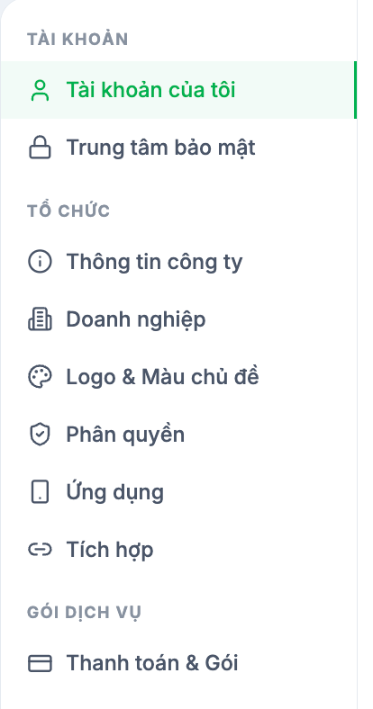
| Group | Item | Contents | Detailed article |
|---|---|---|---|
| ACCOUNT | My Account | Your own account profile in this organization | B1-02 |
| Security Center | Security score, recommendations, signed-in devices | B1-03 | |
| ORGANIZATION | Company Information | Company profile, bank, date and time format | B1-04 |
| Enterprise | Organizational structure: Region · Branch · Department · Job Title | B1-05 · B1-06 · B1-07 | |
| Logo & Theme Color | Logo, interface color, custom sign-in domain | B1-08 | |
| Permissions | Access groups and the system-wide permission matrix | B1-09 | |
| App | Menus and feature permissions displayed in the mobile app | B1-10 | |
| Integrations | Connect Tanca with your company's other tools | B1-11 | |
| PLAN | Billing & Plan | Current plan, employee limit, payment history | B1-12 |
Two levels of settings — don't confuse them
| Level | Where | What it determines |
|---|---|---|
| System Settings | The gear icon in the top-right corner | Organizational structure, permissions, branding, plan — shared across all modules |
| Module Settings | The Settings item at the bottom of the left column in each module | Module-specific business rules: time & attendance rules, request types, payroll templates… |
The most commonly confused example: leave rules are under Time & Attendance › Settings › Leave, not in System Settings. Access groups are the opposite — they are in System Settings, not in any module.
Setup order for a new deployment
- Company Information — especially the date and time format (B1-04).
- Enterprise — Region, Branch, Department, Job Title (B1-05 to B1-07).
- Permissions — review the four default access groups (B1-09).
- Logo & Theme Color — so employees recognize the system as their company's own (B1-08).
- App — decide what employees see in the app (B1-10).
- Billing & Plan — check the employee limit before importing your employee list (B1-12).
Who can access this section
Only accounts in the Manager access group can see the full Settings section. If you open it and only see the ACCOUNT group, your account does not have sufficient permissions — contact your company's administrator.

