An overview of how secure the account you're using is: a score, a list of recommendations, and a list of signed-in devices.
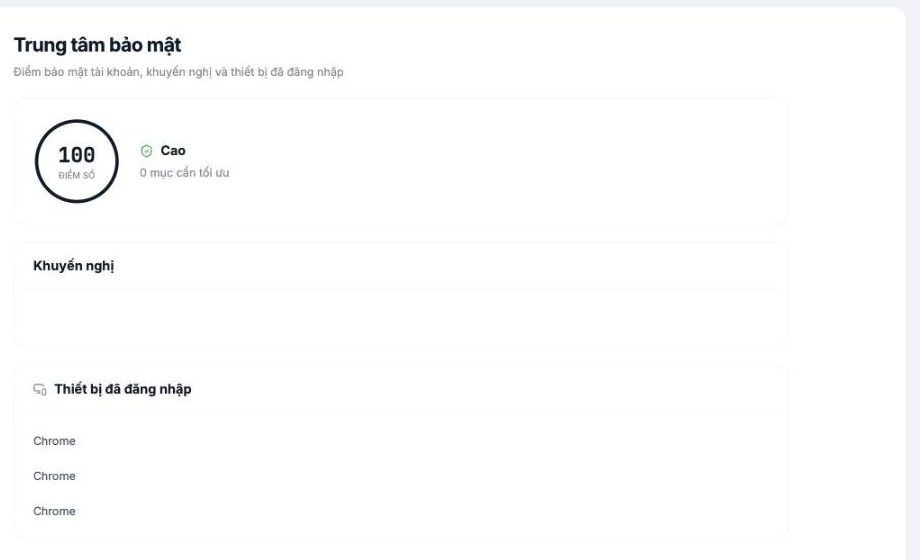
Three sections
| Section | Content | How to read it |
|---|---|---|
| Score | A number from 0 to 100 with a level label | Accompanied by the line n items to optimize. 0 means there are no unaddressed recommendations left. |
| Recommendations | A list of things to do to raise your score | Empty when the score has reached the maximum |
| Signed-in devices | Browsers and devices with an active sign-in session | Review regularly for unfamiliar devices |
This screen is currently view-only — there's no remote sign-out button for individual devices yet, and the device list only shows the browser name, without the sign-in time and location. If you suspect unauthorized access to your account, the reliable fix is to change your password immediately — this forces all old sessions to sign in again.
Good security habits
- Once a quarter, open this screen and review the device list. If you see an unfamiliar browser, change your password.
- Don't share accounts. One account per person, including administrator accounts.
- Have at least two administrators, so you don't depend on one person.
- Review permissions regularly in Settings › Permissions (article B1-09) — excess permissions that accumulate over time are a silent risk.
- Use the change log in the employee profile (article B2-20) when you need to trace who changed what.
Suggestions for the product team
Three additions would make this screen far more useful: a remote sign-out button for each device, display of the time and IP address of each session, and a two-factor authentication option for administrator accounts.

