Requests is the module that touches the most people in a business — every employee submits requests, every manager approves them. Done right, the company can eliminate all paperwork and handwritten signatures; done wrong, requests pile up and employees go back to messaging their bosses privately.
Three concepts to distinguish
| Concept | What it is | Where to set it up |
|---|---|---|
| Request type | A specific form: Leave, Salary advance, Shift registration… | Requests › Settings › By request type |
| Configuration | The rules for that request type: who can submit, how many days in advance, the maximum number of requests per month | The gear icon on the request type row |
| Approval workflow | The chain of approvers through each step | The diagram icon on the request type row |
Six groups of request types
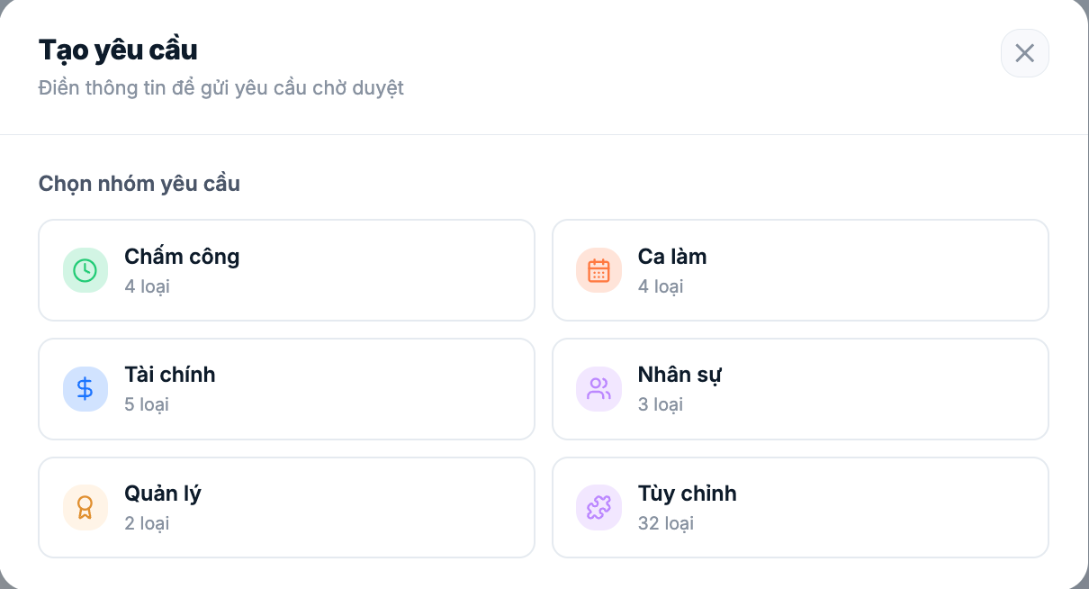
| Group | Available | Examples |
|---|---|---|
| Time & attendance | 4 types | Leave · Overtime · Business trip/Going out · Late arrival/early departure |
| Shifts | 4 types | Shift registration · Shift swap · Clock-in/out time change · Meals |
| Finance | 6 types | Salary advance · Advance - Reimbursement · Payment · Purchasing · Expense payment · Request slip |
| HR | 4 types | Asset borrowing · Vehicle use · Resignation · Equipment change |
| Management | 2 types | Discipline · Rewards |
| Custom | more than 30 ready-made templates | Remote work · Salary confirmation · IT support · Recruitment request · Headcount approval… |
The number of request types shown on the Create request screen may be smaller than the number in Settings. This is because each type has two separate toggles — Available to employees and Available to managers. A disabled type still appears in the configuration list but does not show up when submitting a request.
Rollout roadmap
- Choose the request types you actually need. Don't enable all 53 types. Start with the four that run daily: Leave, Overtime, Business trip, Salary advance.
- Configure each type — submission deadlines, the limit on requests per month, who can submit (article B8-02).
- Design the approval workflow for each type (article B8-04). This is the most time-consuming step and also the most important.
- Set up leave balances for all employees (article B8-08).
- Pilot with one department for two weeks.
- Roll out company-wide, with instructions for employees (articles B8-11 to B8-13).
The most common mistake: enabling every request type in the first week. The result is that employees don't know which form to choose, managers are flooded with notifications, and the whole company goes back to paper. Enable four types, get them running well, and only then add more.
Request codes
Each request has an auto-generated code in the format prefix + date + sequence number, for example `YCCL070926-001`. The prefix is set separately for each request type in the Prefix field in the configuration dialog. Using meaningful prefixes (`NP` for leave, `TU` for advances) helps accounting and HR look things up much faster.

