Tanca can automatically build the schedule for an entire branch based on a goal you choose: saving costs, ensuring adequate staffing, or following projected revenue. This is the most powerful feature of the module, and also the one that needs the most careful verification before you trust it.
Five automatic scheduling methods
Go to Settings › Scheduling › Automatic. Each branch uses one method; click Configure on a card to assign the method to a branch.
| Method | The system optimizes for |
|---|---|
| By cost | The lowest total labor cost while still covering all shifts |
| By staffing | The number of people present in each time slot, based on the declared staffing plan |
| By revenue | Projected revenue for each day — busier days get more people scheduled |
| By rules + AI (recommended) | You write rules in Vietnamese, the AI converts them into constraints and then schedules |
| AI | Let the AI decide on its own based on historical data |
On the QA build, the names and descriptions of these five cards currently display technical codes instead of Vietnamese text (`timesheet_auto_method_cost`…). This is a display bug that has been reported to the engineering team and does not affect functionality. The table above shows the actual meaning of each method.
Writing rules in Vietnamese
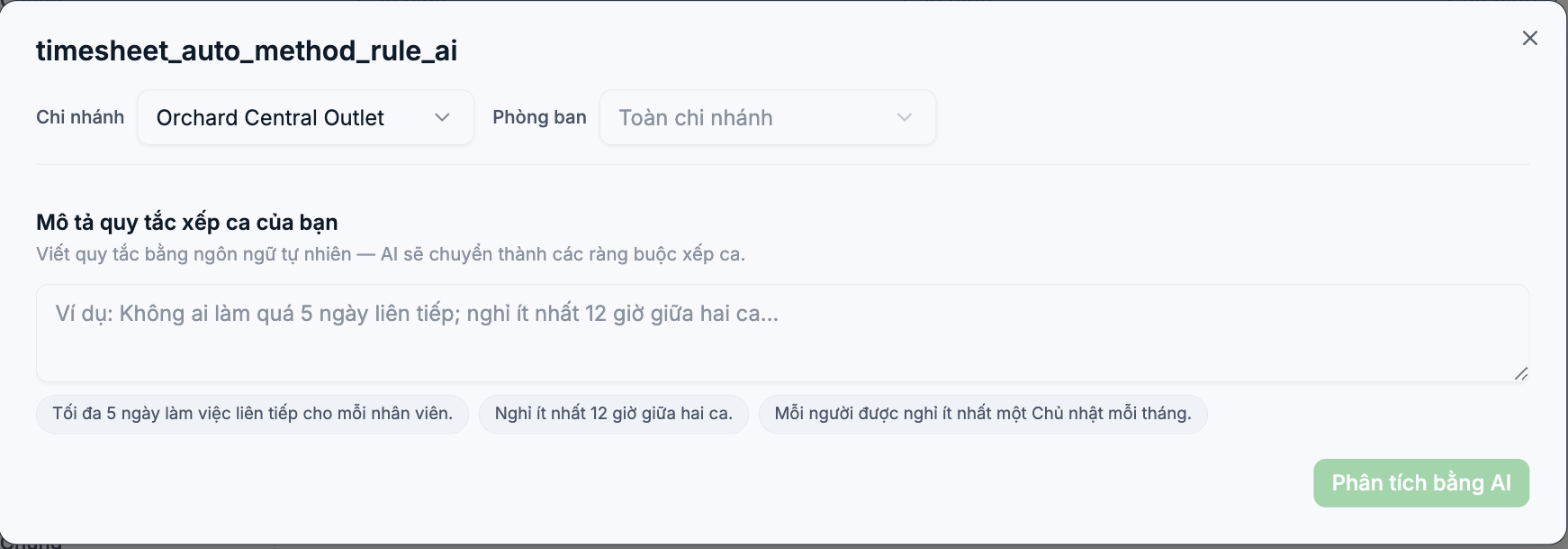
The Rules + AI method is the recommended method because it keeps decision-making in your hands. Select a branch, select a department, then describe the shift scheduling rules in plain Vietnamese sentences. The AI converts those sentences into technical constraints.
Three examples are provided in the interface:
- A maximum of 5 consecutive working days for each employee.
- At least 12 hours of rest between two shifts.
- Each person gets at least one Sunday off per month.
When you're done writing, click Analyze with AI to see how the system interprets your rules. Read these results carefully — if the AI misunderstands a single sentence, the whole schedule will be off.
Write rules as specifically as possible. "Schedule sensibly" is not a rule. "Each shift needs at least 2 kitchen staff and 3 servers" is a rule the AI can use.
Revenue-based staffing forecast
The Time & Attendance › Work Schedule › Forecast screen works with the By staffing, By revenue, and Rules + AI methods.
- Select a branch.
- Click Generate Suggestions — the system calculates the number of people needed for each shift.
- Review the suggestions and the Accuracy score.
- Click Apply to Schedule if you agree, or Export Plan to bring it to a meeting first.
The Forecast screen requires a staffing plan to be declared in advance for the branch. If it hasn't been declared, clicking Generate Suggestions will show an error. Declare the staffing plan in the Staffing module on the module bar.
Three principles for AI shift scheduling
- Run in parallel before trusting it. In the first week, let the AI make suggestions but keep scheduling manually as before, then compare the two versions.
- Always review the schedule the AI generates. Open the By overlapping shifts filter (article B7-08) before publishing.
- AI suggests, people decide. Don't use AI results as grounds to cut someone's shifts without a person reviewing them.
Troubleshooting
| Symptom | Cause |
|---|---|
| Generate Suggestions shows an error | No staffing plan has been declared for this branch yet |
| The AI-generated schedule is short-staffed on weekend shifts | The rules don't specify a minimum number of people per shift |
| The AI schedules people into shifts they lack the skills for | No job title restrictions have been set in the rules or in the shift template |
| Results differ greatly from the actual schedule | Not enough historical data yet; run it for a few more weeks and then re-evaluate |

