The default tab when opening a profile. It contains three data blocks, each with its own Edit button, so you only open the part you need to change.
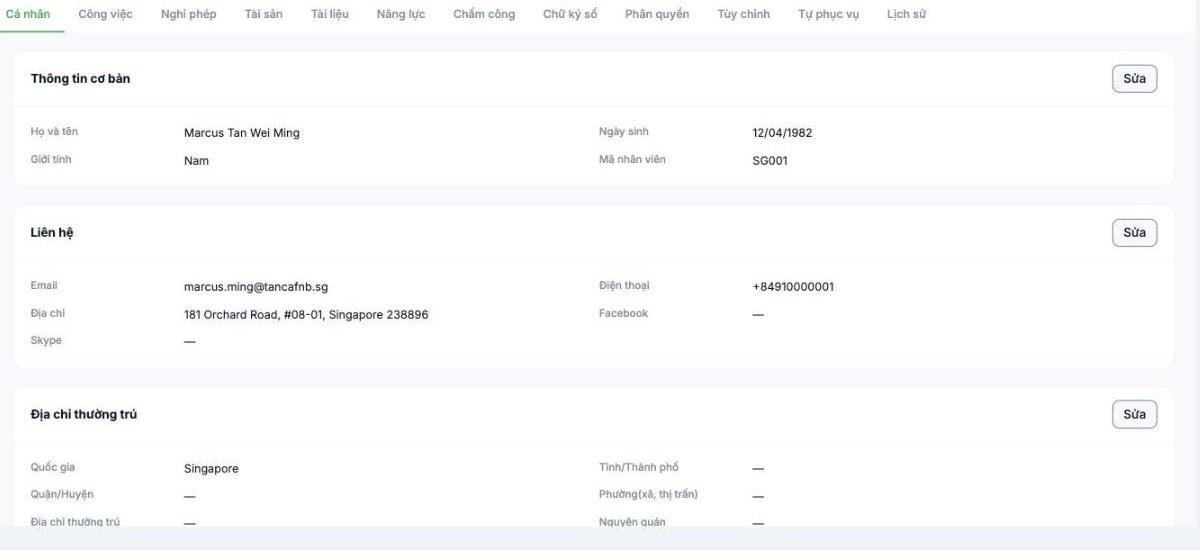
Three data blocks
| Block | Fields | What it affects |
|---|---|---|
| Basic information | Full name · Gender · Date of birth · Employee ID | Display name throughout the system; the employee ID is used for reconciliation with payroll and attendance machines |
| Contact | Email · Phone · Address · Facebook · Skype | Email and phone are login information |
| Permanent address | Country · Province/City · District · Ward (commune, town) · Permanent address · Place of origin | Employment contracts and insurance records |
Steps
- Open the employee profile; the Personal tab is shown by default.
- Click Edit on the block you want to change.
- Update the information, then save.
Changing the email or phone number changes the employee's login information. Let the person know in advance, otherwise they won't be able to log in the next morning and will call the support team.
Notes
- Email must be unique across the entire system. If it duplicates someone else's, it cannot be saved.
- Employee ID should stay unchanged once it has been used for a pay period. Changing the ID midway breaks reconciliation with old data and with attendance machines.
- Permanent address and place of origin are two different fields; insurance records require both.
- For foreign employees, select the correct Country, as this field affects how insurance and taxes are declared.
Which parts employees should declare themselves
These three blocks are mostly personal data that employees know best themselves. Instead of HR typing it in for them, send a self-declaration link from the Self-Service tab (article B2-19) and then approve it. HR should only directly edit administrative fields such as the employee ID.

