Records every change to this profile: who made it, what was changed, when, and from which device. This is the tab you open when there is a dispute about data, and it serves as evidence when you need to trace changes.
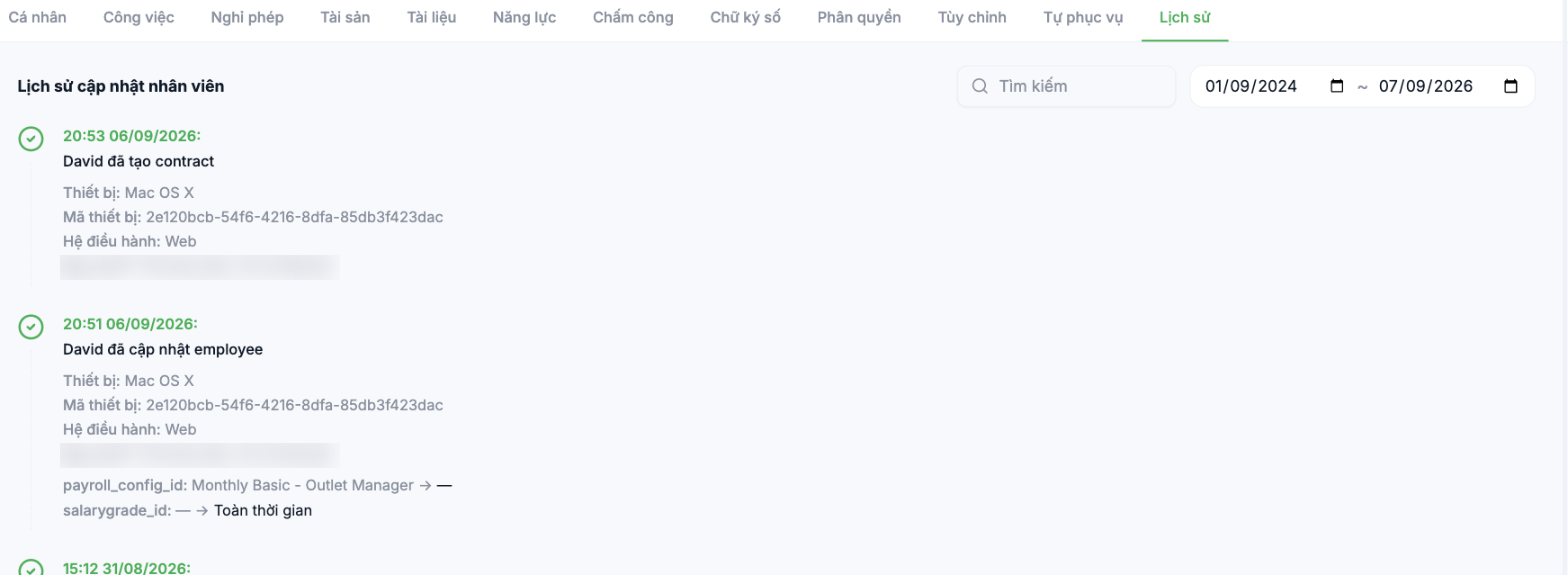
What each entry records
| Information | Example |
|---|---|
| Time | 20:51 06/09/2026 |
| Actor and action | David updated employee |
| Device | Mac OS X |
| Device ID | The device's identifier string |
| Operating system | Web |
| IP address | The network address at the time of the action |
| Change details | `payroll_config_id: Monthly Basic - Outlet Manager → —` — old value and new value |
Searching the log
- The Search box filters by keyword.
- Two date fields limit the time range.
- By default, it shows roughly the last two years.
When to use it
| Situation | How to use it |
|---|---|
| An employee reports this month's salary differs from last month's | Look for changes to the salary configuration and see who changed it and when |
| The leave balance changed for no clear reason | Filter by the suspected time range |
| Periodic review of administrator rights | See who is editing other people's profiles |
| Preparing for an internal audit | Export evidence of changes to key profiles |
The log currently displays technical field names such as `payroll_config_id` and `salarygrade_id` instead of Vietnamese labels. When reading it, understand these as database field names; the product team has been asked to switch to Vietnamese labels for readability.
Notes
- The log cannot be edited or deleted — that is what makes it valuable.
- The log contains IP addresses and device IDs. When sharing screenshots externally, hide these two pieces of information.
- This tab only records changes to the employee profile. The system-wide log is in the administration section — see article group C1.

