Payroll is the final module in the chain: time & attendance produces working days, shifts produce overtime hours, requests produce days off — all of it flows here and becomes the amount employees receive. A mistake anywhere in the chain shows up on the payroll.
The module's six screens
| Screen | What it is for |
|---|---|
| Payroll Templates | A reusable set of formulas for each period. Declare it once, use it forever |
| Pay Periods | The list of pay periods created, by month |
| Payslips | View and export each employee's payslip |
| Payroll Assistant | The module's AI assistant |
| Reports | Seven groups of reports on personnel costs |
| Settings | Keyword Library and Salary Grades — where you declare salary types, allowances and advances |
Three layers of data, done in the right order
- Salary Grades — declare your company's salary types, allowances, advances and other income. Each type you declare automatically generates a keyword usable in formulas (article B9-03).
- Payroll Templates — build the columns and calculation formulas, like an Excel spreadsheet but using keywords instead of cell addresses (articles B9-04, B9-05).
- Pay Periods — each month, create a period from the template; the system pulls in attendance data and calculates (article B9-09).
Do not create a real pay period before the payroll template works correctly. The safe approach: create a test period with one small department, reconcile each row by hand, fix the template, and only then expand.
Seven groups of reports
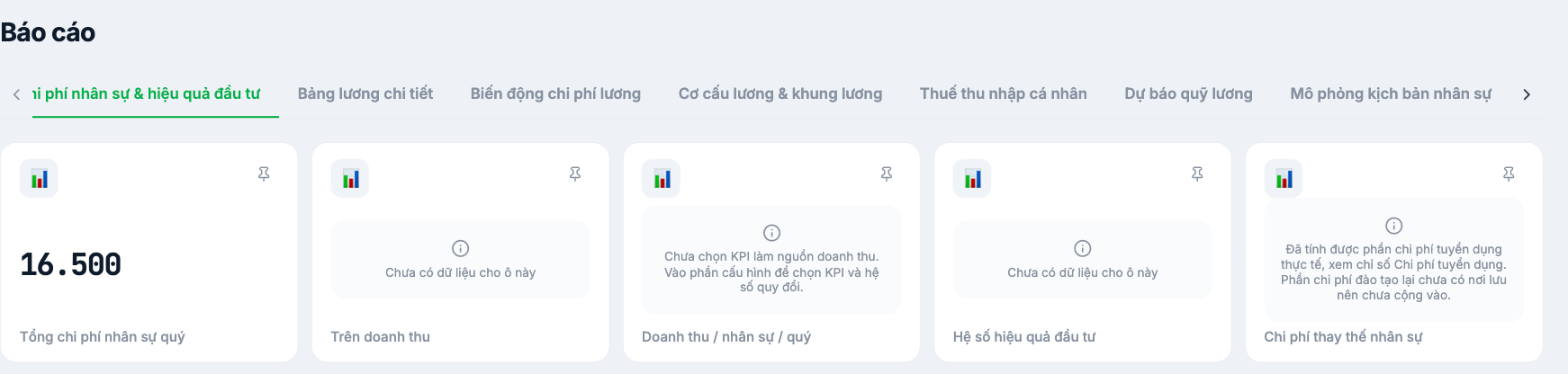
- Personnel costs & return on investment — total quarterly cost, share of revenue, staff replacement cost.
- Detailed payroll — raw data for each period.
- Payroll cost fluctuations — comparison between periods.
- Pay structure & salary bands — salary distribution by grade.
- Personal income tax — summary for tax finalization.
- Payroll budget forecast — estimated cost for the next period.
- Workforce scenario simulation — test the impact of staffing changes on costs.
Each report card has a pin icon to Pin to Dashboard, bringing that metric to the home page.
Rollout roadmap
- Complete time & attendance and requests first (groups B6, B8). The payroll is only correct when the timesheet is correct.
- Declare Salary Grades: salary types, allowances, advances.
- Build a payroll template for one branch.
- Run one test period and reconcile it by hand against the old payroll.
- Fix the template until it matches, then duplicate the template for the other branches.
- Open payslips to employees (article B9-12).
Legal figures in this article must be reviewed by your company's legal or accounting team before being applied. Tanca provides the calculation tools; calculating correctly under the law is the company's responsibility. Always run in parallel with your old calculation method for at least one period before switching over completely.

