Tanca has 14 business modules plus System Settings. Turning everything on at once is the fastest way to confuse the whole company. This article lists each module and suggests an order for turning them on in three phases.
All modules on the menu bar

| Module | What it's used for | Who uses it most |
|---|---|---|
| Dashboard | Overview screen with quick HR metrics | Leadership, HR |
| Headcount Planning | Annual workforce plans and headcount budgets | CHRO, CFO |
| Recruitment | Job postings, candidate pool, interview rounds, AI CV screening | Recruitment HR |
| Talent | Competency frameworks, reviews, 9-box matrix, career paths | CHRO, managers |
| Training | Courses, tests, learning paths, certificates | L&D, employees |
| HR | Employee profiles, contracts, assets, personal income tax, insurance | HR — daily use |
| Time & Attendance | Shifts, timesheets, meal allowances, clock-in method configuration | HR, managers, employees |
| Requests | Leave, overtime, and business trip requests, plus approval flows | The whole company |
| Payroll | Payroll templates, pay periods, payslips, payroll assistant | HR, payroll accountants |
| Tasks | Task assignment, projects, workflows, progress tracking | Managers, employees |
| Connect | Internal Newsfeed, employee interaction | The whole company |
| Information Center | Library of documents, internal rules and regulations | HR, employees |
| Survey | Internal surveys, polls, engagement measurement | HR |
| Communications | Internal announcements with read-rate and acknowledgment tracking | HR, leadership |
The Information Center, Survey, and Communications modules are in the More menu at the end of the bar and are not displayed by default.
System Settings
Settings is under the gear icon in the top-right corner, separate from the business modules. This is where you configure everything shared across the whole system.
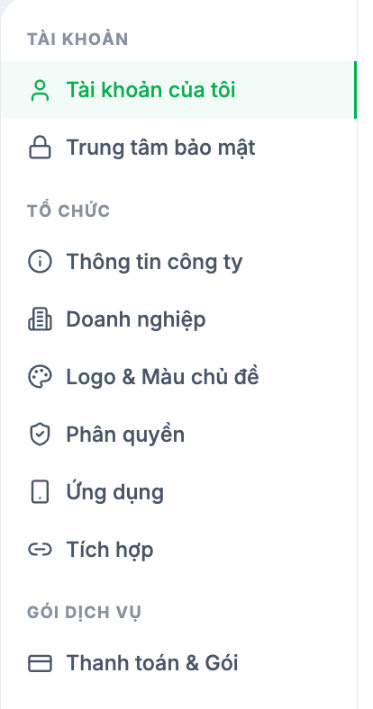
- Account — my account, security center
- Organization — company information, enterprise structure (Region · Branch · Department · Job Title), logo and theme color, permissions, app, integrations
- Plan — billing and current plan
Recommended activation order
| Phase | What to turn on | Why in this order |
|---|---|---|
| Phase 1 — Foundation | Settings (Organization) → HR | Every other module reads data from employee profiles. Mistakes here mean mistakes across the whole system. |
| Phase 2 — Daily operations | Time & Attendance → Requests → Payroll | These are the three things HR does every day and every month. Run one full pay period before moving on. |
| Phase 3 — Internal communication | Connect · Communications · Information Center · Survey | Lightweight and easy to use; helps employees get comfortable with the system before harder tasks are introduced. |
| Phase 4 — People development | Tasks · Talent · Training · Recruitment · Headcount Planning | These need several months of accumulated data to be meaningful. Turn them on too early and the reports will be empty. |
Notes
- The modules you see depend on your current plan — see A1-03.
- In the HR module, the Org Chart and Compliance items are currently labeled Coming soon.
- Each module has its own Settings item at the bottom of the left column, separate from System Settings.

