The Talent Marketplace answers the question "who in our company has this skill?". It's a tool for finding internal people for a project, an open position, or a development program.
Find people by skill
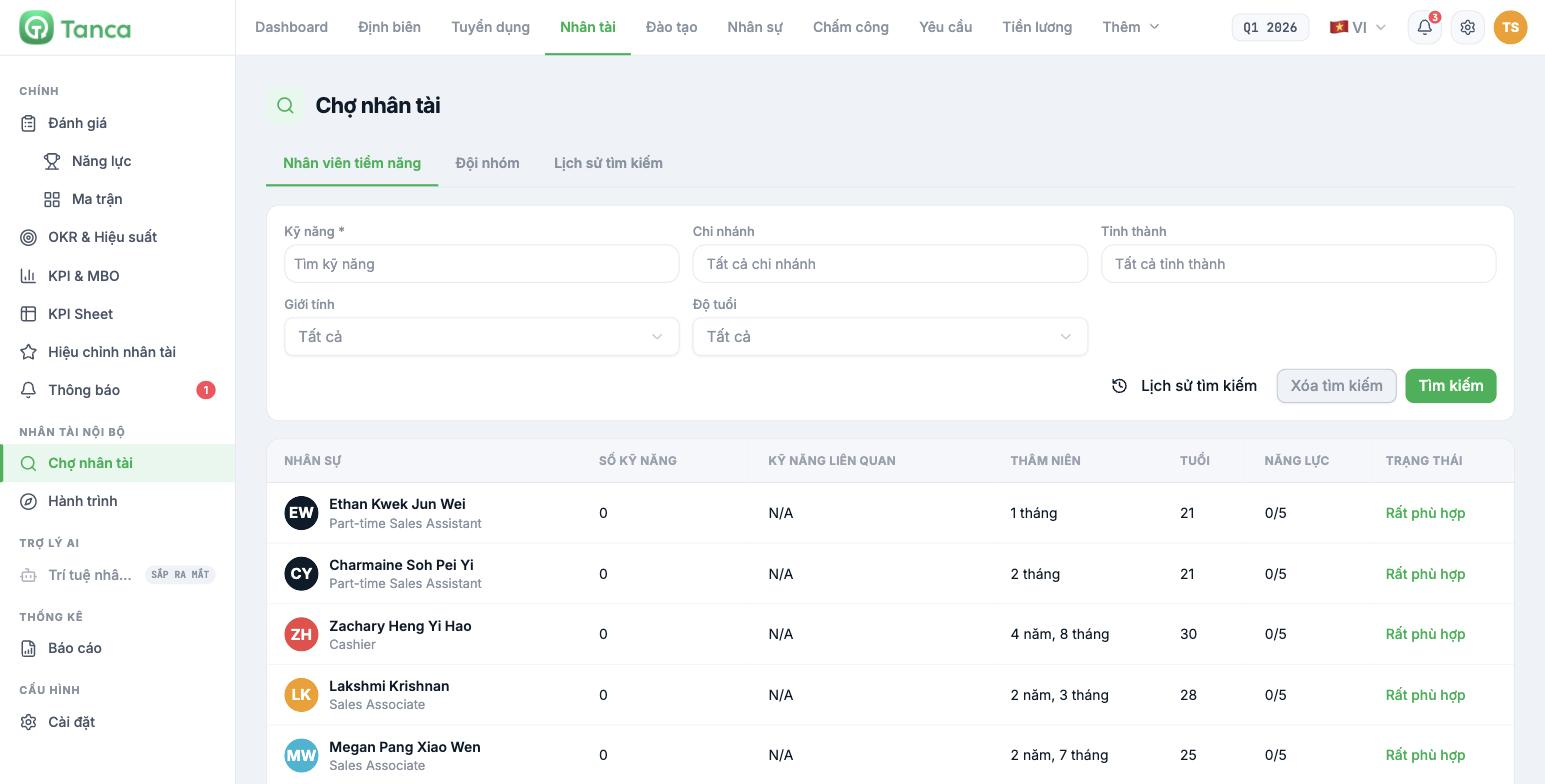
Go to Talent › Talent Marketplace. The screen has three tabs: Potential Employees · Teams · Search History.
| Filter | Notes |
|---|---|
| Skill * | Required. Taken from the Skill Library (article B13-02) |
| Branch | All branches or select one |
| Province/City | By location |
| Gender · Age | See the note below |
Click Search to run it. The Search History button reopens previous searches; Clear Search resets the filters.
Think carefully before using the Gender and Age filters to select people for internal opportunities. In many markets, screening staff by gender or age for promotion, training or assignment purposes is restricted. Let your business's legal department decide whether to use these two filters.
Reading the results table
| Column | Meaning |
|---|---|
| Employee | Name and current job title |
| Number of skills | Number of skills this person has been rated on |
| Related skills | Skills matching the search criteria |
| Seniority | Length of service at the company |
| Age | Age |
| Competency | Score on a 5-point scale |
| Status | How well they match the search criteria |
The Talent Marketplace is only as good as the review data behind it. When no review cycle has been run, every row shows 0 skills · N/A · 0/5 and the Status column says Excellent match for everyone — meaning the results can't distinguish anyone from anyone else. Run a competency review cycle first (article B13-06) before using this screen.
Three uses for the Talent Marketplace
| Task | How to do it |
|---|---|
| Find people for a short project | Search by the project's key skills and filter by branches near the work location |
| Find people for an open position | Search by two or three core skills in that position's competency framework |
| Select people for a training program | Search for people with low scores in the skill about to be trained — a reverse use, but effective |
Search the Talent Marketplace before posting a job opening externally. Internal people already understand the company, the cost is zero, and finding someone in-house is the strongest signal to the rest of the organization that career paths are real.
Teams tab
The Teams tab searches by group instead of by individual — use it when you need to assemble a team for a project rather than find one person.
Successor talent pool
Tanca doesn't have a dedicated screen to mark a "successor pool". The practical approach is to combine three things:
- The nine-box matrix (article B13-08) — take the people in the Bright Star and Rising Star boxes.
- The Talent Marketplace — check whether they have the necessary foundational skills.
- A tracking sheet outside the system (article B13-11) — record and review it every quarter.
Clearly distinguish it from the Talent Pool in the Recruitment module (article B15-12): that pool contains external candidates, while the Talent Marketplace contains people currently working at the company. They are two different places and don't share data.

