Hand data entry over to employees themselves while keeping control with HR. This tab has two parts: creating a link for employees to fill in their own information, and an approval queue for what they have submitted.
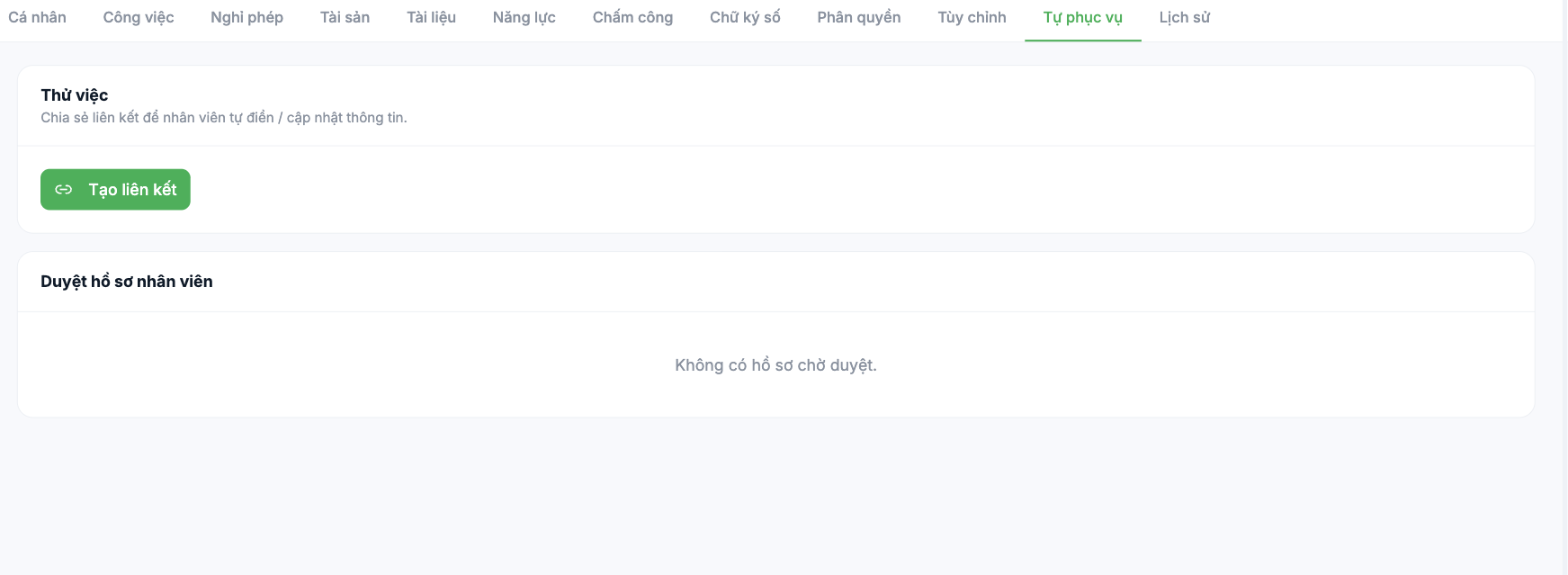
Part 1 — Create a link
- Open the employee profile and select the Self-Service tab.
- Click Create link.
- Copy the link and send it to the employee via email or internal message.
- The employee opens the link and fills in or updates their own information.
Part 2 — Approve employee profiles
What employees declare does not go straight into the profile; it sits in the Employee Profile Approval queue. HR opens it, checks it against the documents, and approves it. Only after approval does the data become official.
The approval mechanism is what makes self-service workable in practice. Employees enter the data — quickly and accurately, because they know their own information. HR verifies it — so control is not lost. This is the cheapest way to complete profiles for the whole company.
Recommended process for the first rollout
- HR first imports the minimum data for all employees via file (article B2-02).
- Create self-declaration links and send them department by department, with a specific deadline.
- Check the approval queue every two days for the first two weeks.
- After the deadline, export the list and filter profiles still missing important fields to follow up individually.
Notes
- The link allows data to be written into the system — send it privately to the right person only; do not post it in group chats.
- Remind employees to have a photo of their citizen ID card and their bank account number ready before opening the link.
- If the approval queue sits unprocessed for a long time, employees will assume that once they have submitted, they are done, and will not check again while the data has not yet taken effect.

