Weights determine which targets carry more weight in the final score. Tanca sets weights in two different places, with two different logics — this article brings them together so you can design them consistently.
Weights in KPI Sheet
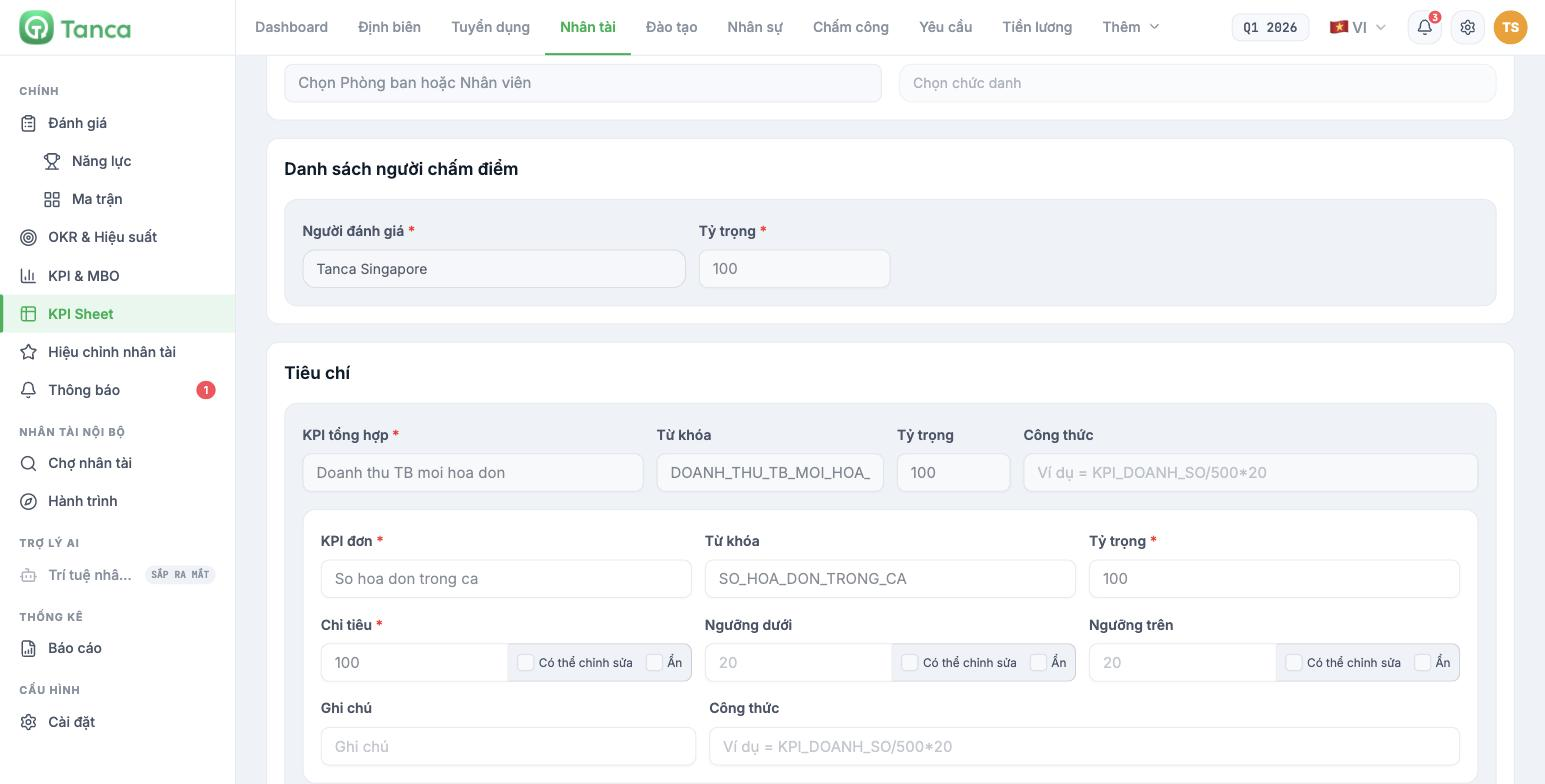
A sheet template has two layers of weights, multiplied together:
- Scorer weight — in the Scorer list block. The total across all scorers must equal 100. For example, line manager 70, regional manager 30.
- Criteria weight — in the Criteria block. Each composite KPI has a weight (total of all groups = 100), and within each group, the individual KPIs have their own weights (total within the group = 100).
The score for a criterion = score given × individual KPI weight × group weight, then summed according to the scorer weights to produce the FINAL RESULT.
| Component | Where it is set | Constraint |
|---|---|---|
| Scorer weight | Sheet template › Scorer list | Total = 100 |
| Criteria group weight | Sheet template › Criteria › Composite KPI | Total of all groups = 100 |
| Metric weight | Sheet template › Criteria › Individual KPI | Total within the group = 100 |
| Target / Lower threshold / Upper threshold | Sheet template › Criteria › Individual KPI | Target is required |
The Lower and Upper thresholds are currently for visual reference only — they do not automatically convert the RESULT into a CONVERTED SCORE. So the real scoring rules live in the internal document you give to scorers, not in the system. Write those rules down and attach them in the Notes field of each criterion.
Weights in OKR

OKR has no weight field. An objective's progress is the average progress of its key results. To make a KR "weigh" more, the only way is to split it into two KRs, or promote it to a separate objective.
Each KR's progress is calculated from the Start value, the Target value and the current value. For lower is better metrics — error rate, inventory, cost — you must check the Inverse target (lower is better) box when creating the KR, otherwise the system calculates in the opposite direction.
Current limitation: for KRs with Inverse target checked, the percentage displayed on the KR row is calculated incorrectly (it divides the current value by the target value, producing figures like 240%) and the completion checkmark is also triggered incorrectly. The progress rolled up to the objective is calculated correctly. When reading, trust the percentage on the objective row and ignore the percentage on inverse KR rows.
Three design principles to follow
- Few but heavy — 3 to 5 criteria per set. Ten criteria at 10% each means no criterion drives behavior.
- Weights should reflect the quarter's real priorities, not be split evenly for the sake of superficial fairness.
- Announce the weights before the cycle begins. Changing weights mid-cycle will skew every score already given and erode the trust of the people being scored.

