Departments determine three things: who requests are routed through, whose data managers can see, and how reports are grouped.
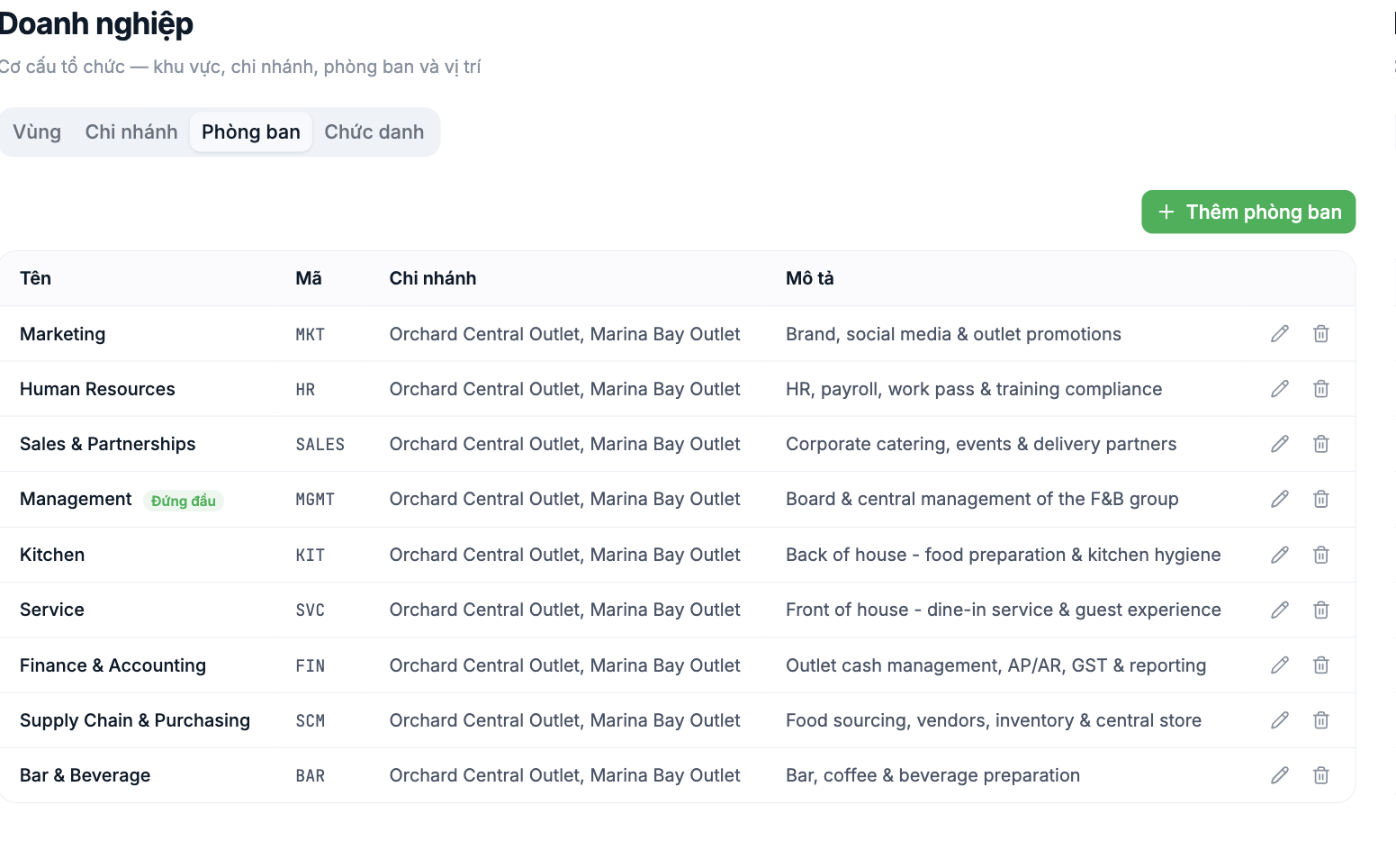
Four fields
| Field | What to enter |
|---|---|
| Name | The department name according to the actual structure |
| Code | Uppercase without diacritics, for example `HR`, `MKT`, `SCM` |
| Branch | Select one or more branches where this department operates |
| Description | The scope of work — helps newcomers understand what the department does |
One department across multiple branches
The Branch field accepts multiple values. For example, if the HR department serves both stores, select both. This is different from creating two separate HR departments — which approach to choose depends on whether the two locations have separate managers.
The Top Level label
The highest-level department is marked Top Level and displayed at the top of the org chart. This is usually the Board of Directors or Management. Only one department should carry this label.
Set up departments according to the actual structure currently in operation, not the desired chart. If two units are currently managed by one person, set them up as one; splitting them later is still possible and much less risky than having to merge them.
Notes
- Departments are the basis of the request approval flow. If set up incorrectly, leave requests go to the wrong approver.
- Departments also determine the data scope managers can see.
- Don't delete a department that still has people. Move all employees to another department first, then delete it.
- The Org Chart item in the HR module is currently labeled Coming soon — the tree view of the chart is not yet available.

