The final step of a pay period: turning the payroll into a file the bank accepts. A mistake here means money goes into the wrong account, so this is the step that needs the most careful checking.
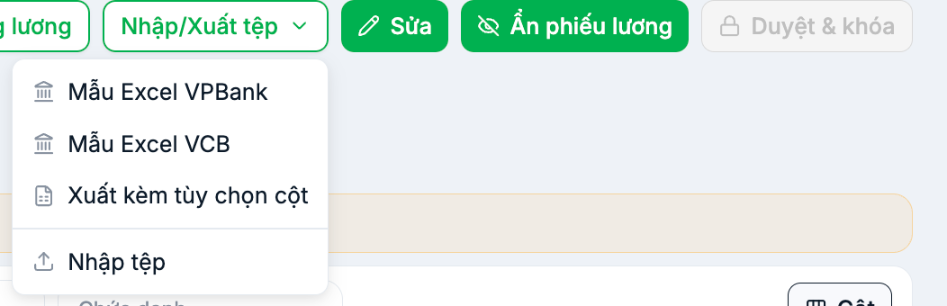
Four options
| Option | Used to |
|---|---|
| VPBank Excel template | A file in VPBank's format |
| VCB Excel template | A file in Vietcombank's format |
| Export with column options | Export the payroll with the columns you choose — for other banks or for record-keeping |
| Import file | Load data into the payroll |
There are currently only two built-in bank templates, both for Vietnamese banks. Companies that use other banks, or operate outside Vietnam, should use Export with column options and then rearrange the file to match their bank's template. We have asked the product team to add more templates.
Prepare bank data
The transfer file is only correct when employee profiles contain complete bank information. Check three fields in the profile (article B2-09):
| Field | Notes |
|---|---|
| Account number | Check every character carefully. This is the field where an error has the most serious consequences |
| Account holder | Must match the name registered with the bank, not the name used at the company |
| Bank | The correct bank, and the correct branch if the bank requires it |
Before the first pay period, send a small test transfer to all employees to catch incorrect accounts. It's far cheaper than dealing with a misdirected salary payment.
Export and verification process
- The pay period has been Approved & locked.
- Select the appropriate bank template in Import/Export File.
- Open the downloaded file and check three things: number of rows, total amount, duplicate account numbers.
- Compare the total amount in the file with the net pay column of the payroll.
- Upload the file to the bank's system and reconcile it against the total the bank reports.
- An authorized person approves the transfer order.
The check for duplicate account numbers in step 3 is often skipped. Two employees with the same account number means one of the two profiles was filled in incorrectly — and one person will not get paid.
Three figures that must match
Before clicking transfer, these three figures must be equal:
- The total of the net pay column on the payroll.
- The total amount in the transfer file.
- The total amount reported by the bank's system after the file is uploaded.
Even a one-dong difference must be traced to its cause before transferring. Small differences are usually due to rounding; large differences are usually due to missing rows — and a missing row is a person who doesn't get paid.
Keeping records
- The payroll export at the time of locking.
- The transfer file uploaded to the bank.
- The bank's transaction confirmation.
- When these three documents match, you have a complete record for the pay period.

